Every hourFlags
Watches for tracking gaps
Compares Shopify orders with the purchases Meta and Google report. When they drift apart, as they do when a pixel or tag stops firing, you get a flag with the numbers.
Xynra drafts ads from your product pages, reviews and brand guidelines, launches the ones you approve on Meta and Google, then continuously checks results against your Shopify sales and recommends what to change.
Start with a free, read-only audit of your ads and store.
Click-through rate down 18% on the top ad as its frequency climbs to 3.4. Possibly creative fatigue.
Every new ad takes ideas, design, feedback and approvals. Once campaigns are live, the work continues, and when results drop the cause isn’t always clear.
Xynra drafts new ads for your team to review. When results change, it checks the creative, tracking and store sales, then recommends what your team should do next.
Follow one product through a sample workspace. Each round of ads starts from what the last round sold.
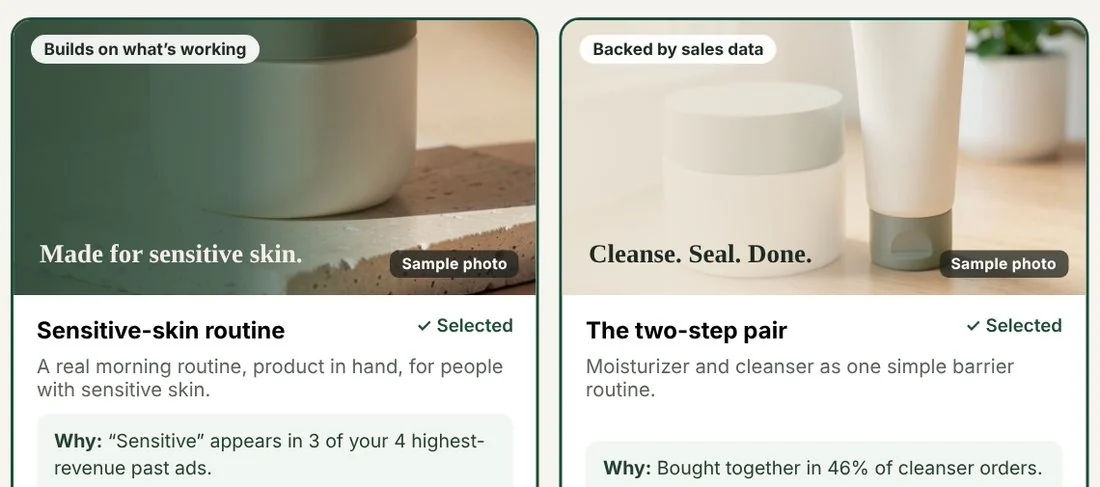
Xynra studies your best sellers, reviews, past ads and competitors, then drafts copy for the most promising angles. Every line is checked against your brand guidelines.
 Juniper & Oak
 Juniper & Oak
Set the schedule and budget. Xynra creates the ads in Meta or Google Ads, and nothing spends until you approve. Or hand the copy and images to your media buyer.
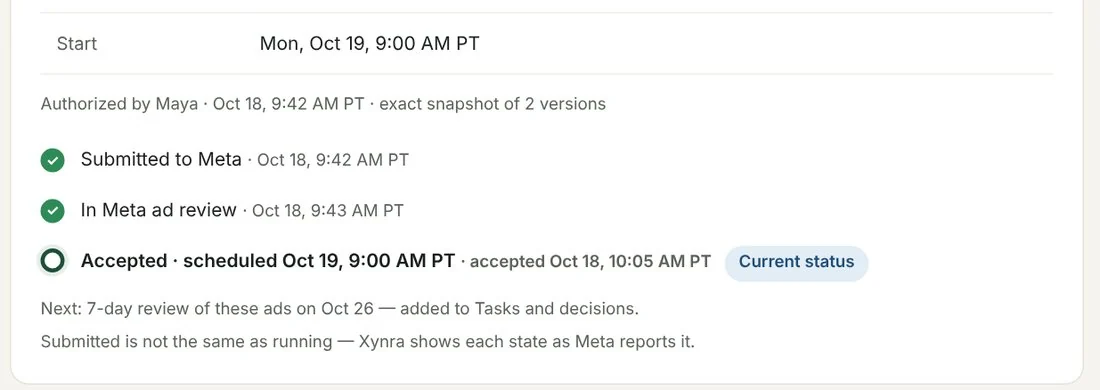
Xynra compares ad performance with your store sales and suggests what to change, with the numbers behind each suggestion.
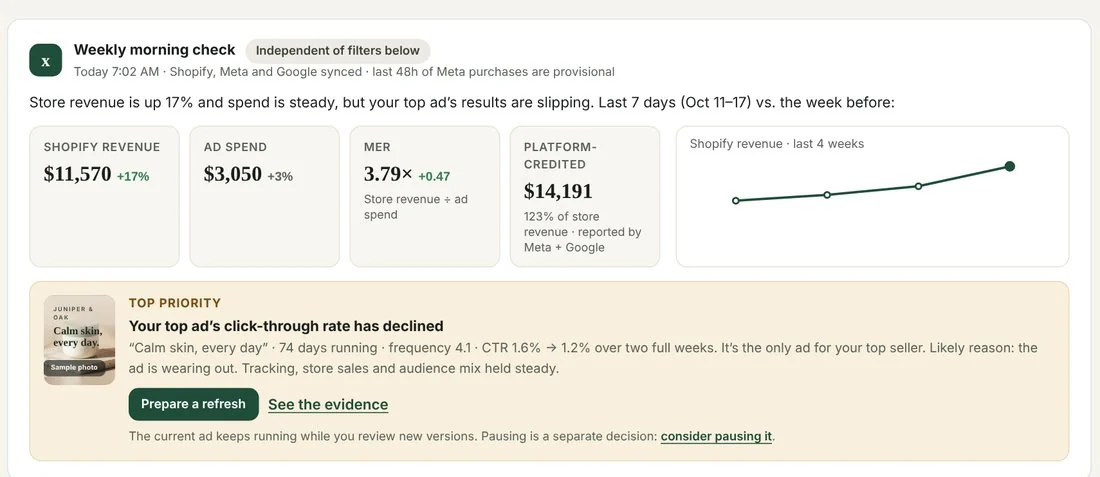
See which angle worked, judged on Shopify orders matched to your ads, and start your next ads from it.
Orders, products, stock and discount codes
Launches and pauses ads, reads results back
Search and Performance Max, results per asset
Your product videos, ready for Google ads
Customer reviews quoted in ad drafts
Alerts and the Monday check, with owners
Weekly check with one-click undo links
Connect Claude or any MCP-compatible AI agent
Xynra runs an MCP server. Connect Claude or any MCP-compatible agent and it can read your products, ads, store sales and Xynra’s findings, then save new ad copy as drafts for your approval.
Between checks of your Shopify orders, stock and ad accounts.
To approve a proposed change. Supported changes can be reversed from Home.
Budget increases made without your approval.
Xynra checks your store and ad accounts every hour. Most findings come to you as flags. A few can be handled automatically, only under rules you turn on.
Compares Shopify orders with the purchases Meta and Google report. When they drift apart, as they do when a pixel or tag stops firing, you get a flag with the numbers.
Flags an ad set spending well past its usual day with no sales. With a spending-limit rule on, Xynra pauses it at the next hourly check.
Follows your Shopify stock. With the stock rule on, ads for a sold-out product pause. When it’s back, you turn them on with one click.
Flags placements with very high click rates but few page visits, often Audience Network, with what they cost. Remove them in one click or by rule.
Sends paid orders to Meta and Google with an estimate of their gross profit, so campaigns can bid toward profit. Your existing tracking stays as it is.
Logs budget, targeting and creative changes, made in Xynra or on the platform, with the week before and after.
There are two ways Xynra changes anything in your ad accounts, and both start with you. The free audit uses neither.
Every launch, budget change and status change is proposed first. You approve that exact change.
Rules are limited to pausing ads or excluding placements. They cannot increase budgets, and every action is logged.
During an audit Xynra only reads. It won’t change, pause or publish anything, and no rules run.
A free, read-only audit. Connect Shopify and your Meta or Google ad accounts, and Xynra shows the ads it would make, the fixes it would suggest and the checks it would run.
Your data and audit history stay. Xynra starts drafting ads, launching the ones you approve, and checking results against your Shopify sales. We’ll set it up with you on a short call.
Do nothing and Xynra disconnects on day 14. Your synced data is deleted 30 days later, or right away if you ask.
We review every request personally and reply within a business day.
Read-only means exactly that: nothing is changed, paused or published in your accounts, including during your peak weeks. Privacy policy
Store revenue per ad dollar is blended. It includes repeat and organic buyers, so it differs from revenue matched to individual ads, which Xynra shows where tracking links exist.
Spend estimates show their calculation. The last 7–14 days, scaled to 30. They can cover the same ads, so the report never adds them together.
Tracking gaps get no dollar figure. They come with the evidence and the steps to check.
You can, and assistants like Claude are very good at answering questions about your numbers. With enough setup they can be scheduled, given memory and connected to tools. Xynra is that setup, built for Shopify brands and ready on day one:
Xynra also runs an MCP server, so Claude and other AI agents can connect to it. Ask about your brand there and the answer comes from Xynra’s data. That connection can save ad copy drafts for your approval, but it can’t launch, pause or spend anything.
No. The audit is read-only: nothing is changed, paused or published, and no rules run. After 14 days Xynra disconnects your accounts and deletes the synced data 30 days later, unless you choose to keep Xynra on. You can also delete your data sooner from the audit page.
Shopify for orders, products and stock, plus Meta Ads and Google Ads (Search and Performance Max). Judge.me reviews, Slack alerts and the Claude connection are optional.
Xynra connects through each platform’s own sign-in, so we never see your passwords. We don’t sell your data; our hosting and AI providers process it only to run Xynra. Disconnect any time in Xynra or in the platform, and email admin@xynra.ai to have stored data deleted. See our privacy policy.
Working with several brands? Ask about multi-brand pilots.
Book a walkthroughStart with a free, read-only audit of your ads, or book a walkthrough of the whole product.
Private beta. Hands-on onboarding, no commitment.
Get occasional product updates by email.